Shopping F.A.Q.
| Shopping Cart Guide |
| 1. | CURRENCY & PAYMENT OPTIONS |
|
All listed prices are in US dollars.
We accept Paypal payments and all major credit cards (VISA, MasterCard, American Express, and Discover) are accepted through Paypal guest payment option (PayPal account not necessary).
|
|
 Back to top Back to top
|
| |
| 2. | ADD ITEMS TO SHOPPING CART |
|
The "Add to Cart" button is only visible in the product description page. From the product catalog page,
just click on any item of interest to reach the product description page. Then, follow the steps
below (refer to Diagram 1):
| 1. | Click on the Size & Price selection box to view and select the size that you want to buy. | 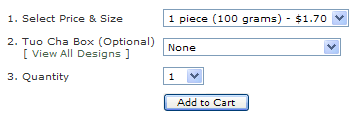
Diagram 1 |
| 2. | The gift box is optional and may not be available for certain items (in which it will either not be displayed or just disabled). You may click on the View All Design link to view the gift boxes available for the product. |
| 3. | Select the Quantity you want purchase. |
| 4. | Click the "Add to Cart" button. You will find the product added to your shopping cart (located to the right; you might have to scroll a little if you do not see it). |
|
|
Back to top
|
| |
| 3. | UPDATING YOUR CART & CHECKOUT |
|
Your shopping cart display is located at the right hand side of most pages. All items added to your shopping bag are listed here.
The "Update Cart" and "Checkout" button will only appear after you have placed an item into your shopping cart.
| | 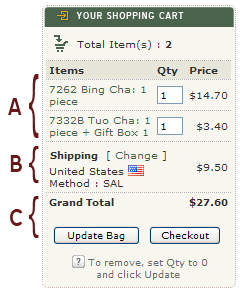
Diagram 2
|
| A. | CHANGING ORDER QUANTITY & REMOVING ITEMS
You may change the order quantity for each product in your shopping cart by entering the desired number into the input box located directly to the right
of the item. Once you are done, click the "Update Cart" button to apply the changes.
To remove any item from the shopping bag, simply set its quantity to zero and click the "Update Cart" button.
|
| B. | SHIPPING CHARGES
Section B displays the estimated shipping cost. You can change the destination country and shipping method by clicking
on the "Change" link here.
|
| C. | GRAND TOTAL & CHECKOUT
Once you're done with your shopping, please click the "Checkout" button. |
| |
|
|
Back to top
|
| |
| Shipping & Returns |
| 4. | SHIPPING METHODS & RATES |
|
- All products are shipped directly from China.
- Orders placed are usually shipped within two business days.1
- When the parcel reaches your country, it would be carried by your national postal service.
- We offer the following of shipping methods2:
| # | Method | Estimated Delivery Time3 |
| 1. | Ground | 6-8 weeks | | 2. | SAL | 4 - 6 weeks | | 3. | Air Parcel | 7 - 14 days | | 4. | Express Mail Service | 4 -7 days |
| NOTE: |
| 1. |
We do not ship on holidays and weekends. |
| 2. |
Availability of SAL and/or ground shipping is limited to certain countries. |
| 3. |
Estimated delivery time is for United States, Australia, and most Asian and European countries.
During holidays, order processing and/or shipping may be slightly delayed.
|
| Method | Weight Unit (X) | First X grams | Subsequent X grams |
| Ground (above 2kg only) | 1 kg | $13.90 | $3.30 | | SAL (above 2kg only) | 1 kg | $17.40 | $8.50 | | Air Parcel | 100 grams | $4.30 | $2.50 | | Air Parcel (if above 2kg) | 1 kg | $26.40 | $15.80 | | Express Mail Service | 500 grams | $29.30 | $10.80 |
| NOTE: |
| 1. |
Additional weight such as the weight of parcel box and packaging that comes with products etc will be added to the total weight when calculating the shipping cost. |
| 2. |
We charge an additional $1.00 for packaging material cost. |
| 3. |
SAL and ground shipping are only available for orders weighing 2kg or more. |
|
|
Back to top
|
| |
| 5. | RETURNS & EXCHANGE |
|
We guarantee your satisfaction with all RoyalPuer.com merchandise. If for any reason you are not completely satisfied,
please contact us within 7 days of receipt of your order to arrange for a return and refund of your money. Returned products must be in their original condition and packaging. We can refund shipping costs only if the return is a result of our error.
|
|
Back to top
|
| |
| 6. | NON COLLECTION |
|
All parcels will be sent as registered shipping if the "Signature of Waiver" option was not selected during checkout.
If no-one is available to sign for the delivery, the parcel will be taken to the local post office for collection.
If the parcel is not collected within the timeframe specified in the delivery attempt card, or as per your
local postal service's policy, it will be returned to us.
In the event of Non Collection we reserve the right to apply a $5.00 administration fee and shipping charges will not be refunded.
The same fee also applies to any parcel refused when delivered on time.
|
|
Back to top
|
| |
| 7. | LATE OR LOST ORDERS |
|
In the event that delivery is late, there is a 45 days
waiting period from notification to RoyalPuer.com before the order is considered
officially lost. Usually, these delays are attributed to the customs process
and are beyond our control. We can either send a replacement, or provide a full
refund (including shipping) if the order is lost.
|
|
Back to top
|
| |
| 8. | TRACKING YOUR ORDERS |
|
We will notify you by email as soon as your package has been shipped.
We use registered service for all types of shipping methods unless Waiver of Signature is exercised.
Only Express Mail Service (EMS) shipping can be tracked (instructions and tracking number will be provided in the notification email).
Availability and timeliness of online tracking facility for other shipping methods solely depend on whether
your national postal service provides it or not.
To learn about the status of your order, please visit My Account page.
|
|
Back to top
|
| |
| 9. | WAIVER OF SIGNATURE |
|
A "Waiver of Signature" authorizes delivery of the package at the carrier’s discretion (if area is secured and protected from weather)
without obtaining the recipient’s signature. This option can be selected during checkout of your order. However, please note
that we will not be responsible if the package is lost or damaged if this option is selected.
|
|
Back to top
|
| |
| Other F.A.Q. |
| 10. | OUR PACKAGING |
|
10.1. SHIPPING BOXES
Your order will be shipped in an extra strength five-layer corrugated box, with the contents inside
protected either by bubble wrap, or white foam board (for larger orders or when shipping fragile products).
10.2. ITEMS INSIDE THE BOX
Products pre-packed in solid boxes will be shipped in their original form.
For those with fragile wrappings such as Bing Chas, we will carefully wrap each of
them with thick brown paper before shrink wrapping it in cellophane.
10.3. 7-PIECE BUNDLE BING CHA
We cannot promise but whenever possible, we will try to include the original bamboo leaves wrapper packaging.
Please contact us if you have any special packaging request.
|
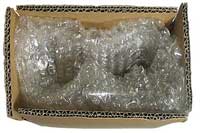
Bubble wrap or white foam board protection
Extra strength five-layer box
|
|
|
Back to top
|
| |
| 11. | I'M NOT GETTING ANY EMAILS FROM ROYALPUER.COM |
|
We don’t send spam or unsolicited mail but still our e-mails can be treated as such.
Why? Because ISPs (Internet Service Providers) and Mail service providers like Yahoo! and Hotmail try hard to block spam. Sometimes they try too hard and mail which is not spam is still blocked.
How do I know if my email from RoyalPuer.com gets blocked?
We will send you
- A confirmation (within 24 hours) when you placed an order
- A notice when your order has been shipped
- A confirmation when you submit an enquiry/feedback to us by using our contact us form
If you are not getting one or several of the above you might have a problem so please read on.
WHITELISTING US IN YOUR E-MAIL PROGRAM, SPAM FILTER, AND MAIL SERVICE
To make sure you receive our e-mail you must make sure we are "whitelisted" in your e-mail program, spam filter, and ISP.
Whitelist us in your e-mail program
If your mail program uses an approved senders list, or a whitelist, put our e-mail addresses on that list:
customerservice@royalpuer.com and newsletter@royalpuer.com (if you have subscribed to our newsletter). You should
also add us to your address book. Most e-mail software now has both built-in spam-filtering and whitelisting
features.
You can also create your own special filters to accept and file incoming e-mail, and to trash other ones. See your
software's help menu for information about spam filters, whitelisting, and creating your own filters, so that you
can indicate to your software to accept mail from RoyalPuer. Your e-mail program may have its own spam (or "junk")
filter. Look at your options for settings on your e-mail to find out how to make sure that your e-mail accepts
mail from RoyalPuer.
If you're using Outlook 2003 or later for your e-mail, you can make sure the e-mails from RoyalPuer are delivered
to your Inbox by letting Outlook know you consider it safe. You can do this several ways, as for instance by:
- opening any e-mail from RoyalPuer, then adding the sender or the sender's domain to your Safe List.
- finding the address in the "From" line of your most recently received mail from RoyalPuer and adding it to
- Personal Contacts in your Outlook Address Book.
- open any e-mail from RoyalPuer, then select Mark as Not Junk.
Whitelist us in your spam filter software
If you use a spam filter outside your e-mail server as well (like McAfee, SpamKiller, SpamAssassin), make sure
that you have whitelisted e-mail from customerservice@royalpuer.com and newsletter@royalpuer.com (if you have subscribed to our newsletter).
Whitelist us with your mail service
- Hotmail or MSN
Place RoyalPuer.com on what is called your "Safe List". The "Safe List" can be accessed via the "Options" link,
on the far right of the main menu tabs, and then by clicking on the Junk E-Mail Filter link.
- Yahoo! Mail
If our e-mail is filtered to your "bulk" folder, open the message and click on the "This is not spam" link next to
the "From" field. You can also create a "filter" at Yahoo that sends RoyalPuer's e-mail into your
Inbox and not the Junk/Bulk Mail folder:
Open your Yahoo! e-mail. Left-click on "Mail Options" on the right side of the screen. In the right hand column,
under "Management" you need to left-click "Filters" then left-click on "Add Filter."
Call this filter 'RoyalPuer'.
Find the place where it says "if all of the following rules are true ..." and go to the top row labeled "From
header." Choose "contains" in the drop-down menu and type in "@royalpuer.com".
At the bottom, choose "Inbox" from the drop-down menu where it says "Move the message to:"
Finally, left-click on the "Add Filter" button.
- Gmail
If our e-mail isn't getting through to you, make sure that it has not been mistakenly marked as Spam:
Click Spam along the left side of any Gmail page.
Check mark the box next to our newsletter.
Click Not Spam button along the top.
- Other Mail Services
Each mail service is a little different, but the idea is the same. If you can't find how to add
customerservice@royalpuer.com to a whitelist, try adding them to your address book, or
moving our e-mail from the Junk folder to your "inbox", or forwarding the message to yourself (if you're getting
it at all, that is).
|
|
Back to top
|
| |
|
  |  |  |  | Item(s) : 0 | | Your shopping cart is empty |
|
| |  |  | | |  | | | | | | | | |  | | | | | | |
|